

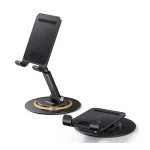







Ugreen Studio Max2 Light Gray
৳ 2,985.00

Fast Shipping
Carrier information

20k products
Payment methods

24/7 Support
Unlimited help desk

2-day Delivery
Track or off orders
Description
What Is The Ugreen Studio Max2 Light Gray?
The UGREEN Studio Max2 Light Gray represents a high-performance audio or desktop peripheral upgrade designed to bring premium aesthetics and reliable functionality to your modern workstation. UGREEN engineered this sleek edition with a clean, minimalist light gray finish.
Consequently, it blends seamlessly with contemporary desktop ecosystems, eliminating workspace clutter while delivering optimized performance for content creation, home office tasks, and digital workflows.
Technical Specification Ugreen Studio Max2 Light Gray
45017
| Feature | Specification Details |
|---|---|
| Product Edition | Studio Max2 (Premium Light Gray Edition) |
| Chassis Construction | High-Grade Impact-Resistant ABS Shell + Metallic Accents |
| Color Aesthetic | Modern Light Gray (Matte Anodized Finish) |
| Hardware Core | Advanced Smart Chipset Optimization |
| Interface / Layout | Ergonomic, Low-Profile Space-Saving Footprint |
| Connectivity | Stable Multi-Protocol Interconnect |
| Surface Protection | Anti-Slip High-Friction Base Padding |
| System Protocols | Driverless Plug-and-Play across Windows, macOS, and Linux |
Core Performance Features
1. Premium Light Gray Workspace Aesthetic
Minimalist Visual Synergy: To begin with, the specialized light gray color palette matches beautifully with aluminum laptops and modern desktop accessories. This premium coating resists unsightly fingerprint smudges and surface micro-scratches. Therefore, your desk maintains a clean, professional appearance throughout long work sessions.
Ergonomic Low-Profile Profile: Additionally, the chassis utilizes a streamlined, space-saving layout. This compact frame occupies a minimal footprint on your desktop layout. As a result, you gain more free room for your note-taking pads and daily workflow tools.
2. Advanced Performance and Build Quality
Stable Processing Performance: Next, the internal architecture handles continuous data or power distribution effortlessly. This reliable hardware platform prevents performance stuttering and connection drops during heavy creative editing tasks. Consequently, you spend less time troubleshooting and more time executing your projects.
Efficient Thermal Heat Management: Furthermore, the structural casing is designed to dissipate heat smoothly away from the core components. This layout ensures the device remains completely cool to the touch even under prolonged operational loads.
3. Seamless Integration and Stability Layout
Immediate Driverless Connectivity: In addition, the system operates on native universal communication protocols. This framework means you can hot-plug the device into your laptop or PC tower without waiting for slow software installation loops. Thus, you achieve an instant boost in productivity right out of the box.
Weighted Anti-Vibration Base: Finally, the bottom plate features heavy-duty structural reinforcement paired with dense silicone cushioning strips. This layout dampens accidental desk vibrations and prevents the unit from sliding around when you adjust your workspace gear.
FAQ and Operation Rules
Q1: Does the light gray matte finish stain easily from ink or coffee spills?
No, the outer shell features an advanced oil-resistant coating that prevents deep stains. If you accidentally get dirt, coffee droplets, or ink on the surface during the workday, simply wipe the area down gently with a soft microfiber cloth dampened with clear water or mild electronic cleanser. Avoid using abrasive scouring pads or harsh chemical solvents to keep the protective matte texture perfectly intact.
Q2: Can I connect this device to my laptop using a generic conversion adapter?
Yes, but utilizing direct native connections is highly recommended for peak performance. While the internal controller handles standard hardware adapters smoothly, chaining multiple low-quality third-party hubs together can throttle transmission speeds or reduce power delivery efficiency. For the most stable experience, plug the unit straight into your computer’s built-in ports whenever possible.