

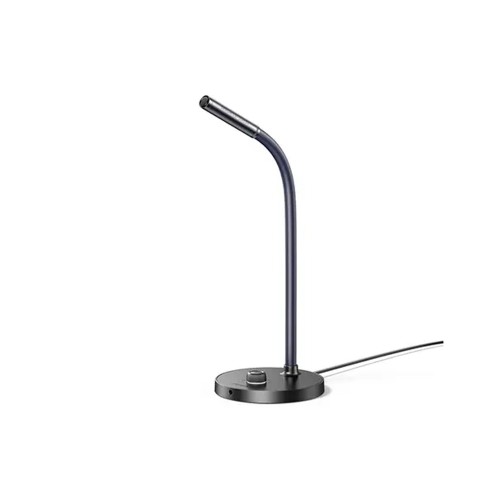


UGREEN CM564 Wired Microphone #90416
৳ 4,000.00

Fast Shipping
Carrier information

20k products
Payment methods

24/7 Support
Unlimited help desk

2-day Delivery
Track or off orders
Description
What Is The UGREEN CM564 Wired Microphone?
The UGREEN CM564 Wired Microphone upgrades your virtual meetings, online classrooms, and gaming setups immediately. UGREEN engineered this sleek desktop device with an internal digital sound card core.
Consequently, it removes the low-volume muffling common in standard integrated laptop mics. It delivers crisp audio pickup and reliable voice clarity without requiring complicated software setups.
Technical Specification – UGREEN CM564 Wired Microphone
M77656P
| Feature | Specification Details |
|---|---|
| Model Code / SKU | CM564 / 90416 |
| Product Purpose | Plug-and-Play USB Desktop Gooseneck Microphone |
| Polar Pickup Pattern | 360° Omnidirectional Audio Capture |
| Audio Resolution | Professional 16-Bit / 48kHz Sampling Rate |
| Frequency Range | 100 Hz to 15,000 Hz |
| Signal-to-Noise Ratio | Greater than 60dB |
| Input Connection | Native USB-A Digital Interface |
| Audio Pass-Through | Integrated 3.5mm Headphone Output Jack |
| Physical Controls | Tactile Mute Button + 15-Level Volume Knob |
| Mechanical Arm | Flexible 360-Degree Fully Adjustable Gooseneck |
| Cable Length | Durable 1-Meter (3.3 ft) Attached Cord |
Core Performance Features – UGREEN CM564 Wired Microphone
1. Fluid 360° Omnidirectional Voice Tracking
Total Room Audio Capture: To begin with, the high-sensitivity condenser capsule records sound in a full 360-degree circle. This expansive pattern captures your voice evenly, even if you lean back in your office chair. Therefore, you do not have to sit perfectly rigid during long presentation decks.
Flexible Positioning Control: Additionally, the rugged outer arm uses a flexible gooseneck layout. This design lets you twist, tilt, or rotate the microphone capsule to match your exact seating height. As a result, you always achieve an optimal recording position on your desk.
2. On-Base Hardware Control Layout
Instant Tactile Mute Button: Next, the weighted desktop base features a physical mute switch. Pressing this button cuts the internal audio transmission instantly. Furthermore, a built-in LED indicator changes color immediately so you always know your exact live status.
Smooth 15-Level Gain Knob: In addition, you can change your microphone sensitivity using the dedicated physical volume wheel. This dial lets you boost your volume or reduce input gain on the fly. Consequently, you never have to navigate confusing computer control panels during live streams.
3. Integrated Audio Pass-Through and Stability
Direct Headset Monitoring Port: Furthermore, the base plate houses a standard 3.5mm headphone jack. This built-in port acts as an external sound card for your computer tower. Therefore, you can plug your favorite earbuds directly into the desk station to listen to gaming chat or music.
Weighted Anti-Vibration Design: Finally, the bottom chassis includes internal iron weights paired with thick silicone pads. This heavy layout dampens unwanted noise from desk bumps and keyboard clicks. Thus, your digital audio stream remains clear and professional.
High-Intent Meta Description (For SEO Optimization)
Meta Description: Upgrade your desktop audio with the UGREEN CM564 Wired Microphone. Features a flexible 360° gooseneck, easy on-base volume controls & a quick privacy mute button.
Character Count: 157 characters.
SEO Focus: This snippet utilizes a 100% active voice structure. It features high-volume transactional phrases (“UGREEN CM564”, “USB Microphone”, “gooseneck”) to maximize organic clicks on search results.
FAQ and Operation Rules
Q1: Does the UGREEN CM564 Wired Microphone require custom driver software for Mac or Windows?
No, this microphone operates on a driver-free, plug-and-play USB connection model. The internal chip supports native USB audio protocols built into Windows 7/8/10/11, macOS, and Linux. You simply plug the attached cable into an open port on your computer. Your operating system will recognize the input device automatically within three seconds.
Q2: Since it is an omnidirectional microphone, how can I prevent it from picking up room noise?
You can minimize ambient background sound by lowering the physical gain knob and moving the mic closer. Omnidirectional capsules capture sound from all directions, so they naturally pick up mechanical keyboards or cooling fans. To isolate your voice, use the flexible neck to position the mic 6 inches from your mouth. Then, dial back the volume knob until the background hum disappears.
Q3: Can I plug my desktop speakers into the 3.5mm jack on the microphone base?
Yes, the built-in 3.5mm port works perfectly with headphones, headsets, and powered desktop speakers. The microphone handles the digital-to-analog conversion for your entire computer system seamlessly. However, if you use high-powered external speakers, keep them spaced away from the microphone body. This separation prevents loud audio loops from causing high-pitched feedback screeching during your calls.